Google Ads can bring in a steady stream of leads and sales, but it isn’t free. And figuring out how much to spend on Google Ads is one of the first hurdles new advertisers run into.
Here’s the quick answer: a good starting budget for Google Ads is $1,500 to $3,000 a month for a typical small business. That’s usually enough to get a few hundred clicks and learn what’s working within about 90 days.
Of course, your number might look different. A local plumber, an online homeware shop and a software company are all bidding in very different auctions, and click prices change from one country to the next, too.
In this guide, we’ll walk you through:
- Realistic starting budgets by business type
- How to calculate your own Google Ads budget (with simple formulas)
- Three real-world examples
- The hidden costs to plan for
- What to do in your first 90 days
The Short Answer: A Realistic Google Ads Starting Budget
Your budget depends mostly on how much clicks cost in your industry. Use this table as a starting point, then fine-tune it with the formulas below.
| Business type | Starting budget (per month) | Daily budget |
| Low-competition local service or niche shop | 500–1,500 | 15–50 |
| eCommerce store | 1,500–3,000 | 50–100 |
| Competitive local service (trades, dental, clinics) | 1,500–4,000 | 50–130 |
| B2B and SaaS | 2,000–5,000 | 65–165 |
| Legal, finance and insurance | $5,000+ | $165+ |
Keep in mind, these numbers cover ad spend only (not agency fees) and assume a mid-priced market. If you’re advertising in an expensive country or a big city, expect to land on the higher end.
Why Google Ads Budget Advice Is All Over the Place
If you’ve searched this question before, you’ve probably seen one person say $10 a day is plenty, and another say anything under $2,000 a month is a waste. Confusing, right? The good news is that both can be true.
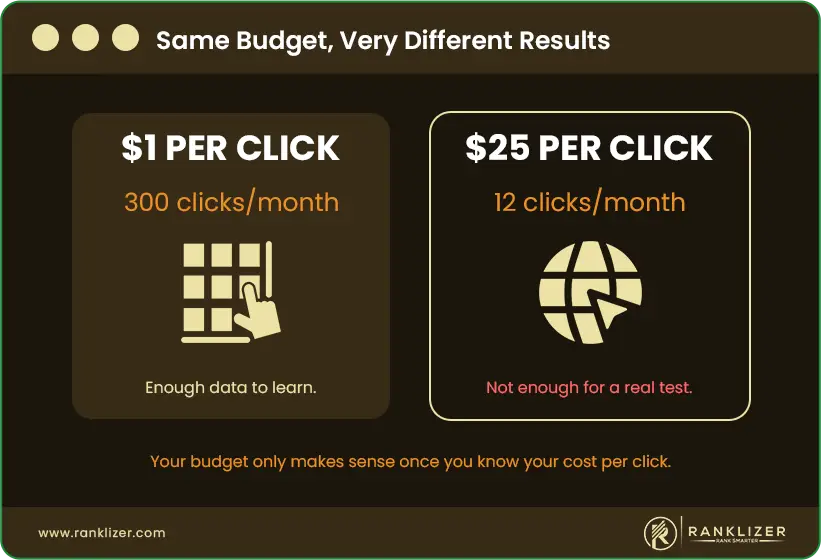
It all comes down to your cost per click (CPC). A budget only makes sense once you know what a click costs in your market:
- At $1 per click, $10 a day gets you around 300 clicks a month. That’s a solid amount of data to learn from.
- At $25 per click, that same $10 a day gets you about 12 clicks. Not much to go on! In industries where clicks cost 25–100, a $500 monthly budget simply isn’t enough for a real test.
So instead of asking “How much do other businesses spend?”, ask yourself: “How many clicks do I need, and how much will they cost?” Let’s figure that out.
What Affects Your Google Ads Cost Per Month?
Four main things determine how much you’ll pay for each click: your industry, your competition and location, your Quality Score and your campaign type. Let’s look at them one by one.
1. Your industry’s average CPC
Some industries simply cost more to advertise in. When customers are worth a lot (think lawyers or insurance providers), more businesses compete for those clicks, and prices go up.
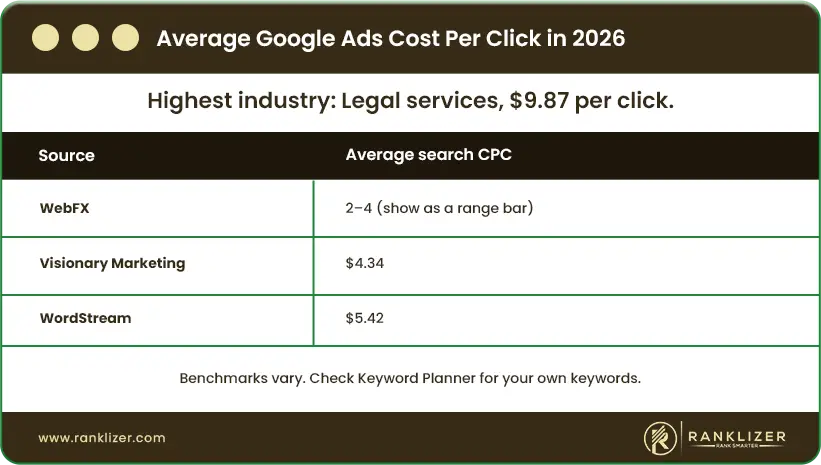
Here’s what 2026 benchmark reports show for average search CPC, largely based on US advertisers:
- WebFX: 2–4 per click
- Visionary Marketing: $4.34 per click, up 19% from last year
- WordStream: $5.42 per click across all industries, with legal services the highest at $9.87
Why don’t these numbers match? The reports look at different accounts, industries and campaign types, so their averages naturally differ.
They’re great for getting a general idea. For your actual budget, use Google’s Keyword Planner to see estimated CPCs for the exact keywords you want to target.
2. Competition and location
The more businesses bidding on a keyword, the more you’ll pay per click. Location plays a big role here, too.
Big cities usually come with higher prices. In London, for example, clicks cost about 15–30% more than in the rest of the UK.
3. Quality Score
Quality Score is Google’s rating of how relevant your keywords, ads and landing pages are. The good news? It’s something you can actually control.
Higher Quality Scores usually mean cheaper clicks. One agency estimates that improving your score from 5 to 8 can lower your CPC by 15–25%.
4. Campaign type
Different campaign types come with different price tags:
- Search campaigns show your ads when people search on Google. Clicks cost more, but these people are actively looking for what you offer.
- Display campaigns show image ads across websites. Clicks are much cheaper (around 0.50–1), but they convert less often and work best for building awareness.
- Performance Max campaigns run across all of Google’s channels at once. They need a bigger budget and some conversion data to work well.
If you’re working with a smaller budget, start with a Search campaign. Spreading a small budget across too many campaign types means none of them gets enough data to succeed.
How to Calculate Your Google Ads Budget
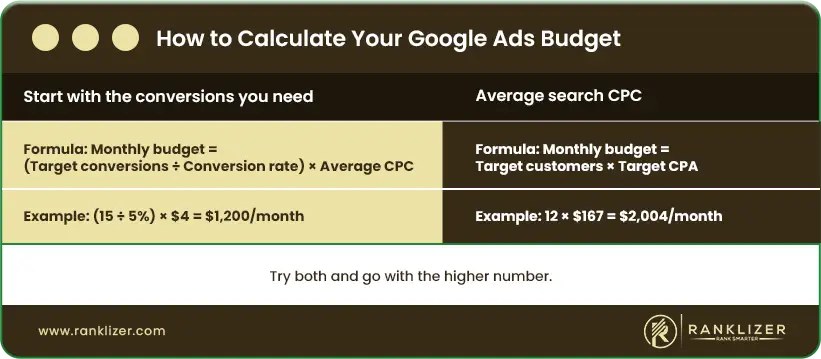
Ready to find your number? There are two simple ways to do it. We recommend trying both and going with the higher result.
Method 1: Start with the conversions you need
This method works backward from how many leads or sales you want.
As a general rule, aim for at least 15 conversions a month so you have enough data to judge performance. If you plan to use automated bidding strategies like Target CPA, 30 or more is even better.
Here’s the formula:
Monthly budget = (Target conversions ÷ Conversion rate) × Average CPC
Example: Let’s say you want 15 conversions a month, your landing page converts 5% of visitors, and clicks cost about $4.
- You’d need 300 clicks (15 ÷ 0.05).
- 300 clicks × $4 = $1,200 a month, or about $40 a day.
Method 2: Start with your target cost per acquisition (CPA)
Your CPA is how much you spend on ads to win one new customer. This method helps make sure your ads stay profitable.
- Figure out what a customer is worth. Think beyond the first purchase. If customers come back again and again, include that lifetime value.
- Decide how much you’re willing to pay for each customer. For example, if a customer is worth $500 and you want a 3:1 return, your target CPA would be about $167.
- Multiply by how many new customers you want each month.
Monthly budget = Target customers per month × Target CPA
Just remember: lifetime value is revenue, not profit. Be sure to factor in product costs, refunds and other expenses when you set your target CPA.
Pro tip: If you’d rather start from your overall budget, a common rule of thumb is to spend 6–10% of revenue on marketing, with 20–40% of that going to paid ads like Google Ads.
How to turn your monthly budget into a daily budget
Google Ads asks for a daily budget, not a monthly one. To find your Google Ads daily budget, divide your monthly budget by 30.4 (the average number of days in a month).
| Monthly budget | Daily budget |
| $500 | $16.45 |
| $1,000 | $32.89 |
| $1,500 | $49.34 |
| $3,000 | $98.68 |
| $5,000 | $164.47 |
Wondering how to avoid ad campaigns running over budget? Don’t worry if Google spends more than your daily budget on some days. Google can spend up to twice your daily budget when traffic is high, but it balances out.
You won’t be charged more than 30.4 times your daily budget over the month.
How Location Affects Your Google Ads Budget
Where you advertise can make a big difference in how much you pay. A budget in advertising that works great in one country might not stretch very far in another.
Why click prices vary by country
Google Ads prices are set by local auctions, so there’s no single worldwide rate. Countries with lots of advertisers, like the US, UK, Canada and Australia, tend to have the highest click prices.
In less competitive markets, the same keyword might cost just a fraction as much.
That’s also why it’s smart to take published benchmarks with a grain of salt. Many of them are based on US data, so they may not reflect what you’ll actually pay where you advertise.
How to estimate costs for your market
Here’s a quick way to get a more accurate number:
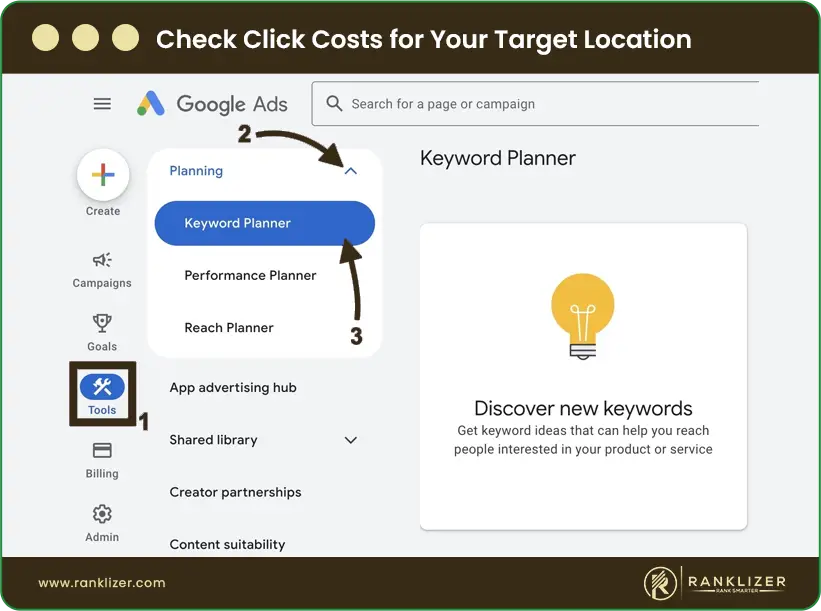
- Open Google Keyword Planner.
- Set your location to the countries or cities you want to target.
- Enter your main keywords and check the estimated bids.
- Plug those CPCs into the formulas above.
Don’t forget about city premiums.
Big cities usually cost more than smaller towns. If you serve customers nationwide, try lowering your bids in the most expensive cities (or skipping them entirely) to make your budget go further.
Plan for taxes
Depending on where you’re based, Google may add VAT, GST or another tax to your bill. If you can’t claim it back, a $1,000 budget with a 20% tax actually costs you $1,200.
It’s worth checking with your accountant before you finalize your budget.
Google Ads Budget Examples for 3 Types of Businesses
Formulas are helpful, but they’re much easier to understand with real numbers. Here’s how the math works for three example businesses:
| Local plumbing company | Online homeware shop | B2B software company | |
| Average CPC | $8 | $1.50 | $6 |
| Conversion rate | 8% (leads) | 2.5% (orders) | 3% (demo requests) |
| Monthly goal | 20 leads | 40 orders | 10 demos |
| Clicks needed | 250 | 1,600 | 334 |
| Monthly budget | $2,000 | $2,400 | $2,004 |
| Daily budget | ~$66 | ~$79 | ~$66 |
Example 1: A local plumbing company
Home improvement clicks average around $8.33 in competitive markets, so $8 per click is a realistic estimate.
If half of the 20 leads turn into $400 jobs, that’s about $4,000 in revenue from $2,000 in ad spend. Not bad!
Just keep in mind that’s before labour and materials, and it doesn’t count repeat customers or referrals.
Example 2: An online homeware shop
With an average order of $75, 40 orders bring in $3,000. That’s only 1.25 times the ad spend, which might look disappointing at first.
But here’s where lifetime value comes in.
If customers order 2.5 times a year on average, those 40 customers are worth $7,500. That’s a 3x return from the same campaign!
Example 3: A B2B software company
If 20% of demos turn into customers, 10 demos means 2 new customers. At $6,000 a year each, that’s $12,000 in annual revenue.
Since B2B sales can take months to close, judge your early results by the quality of your demo requests, not just closed deals.
The Hidden Costs of Google Ads
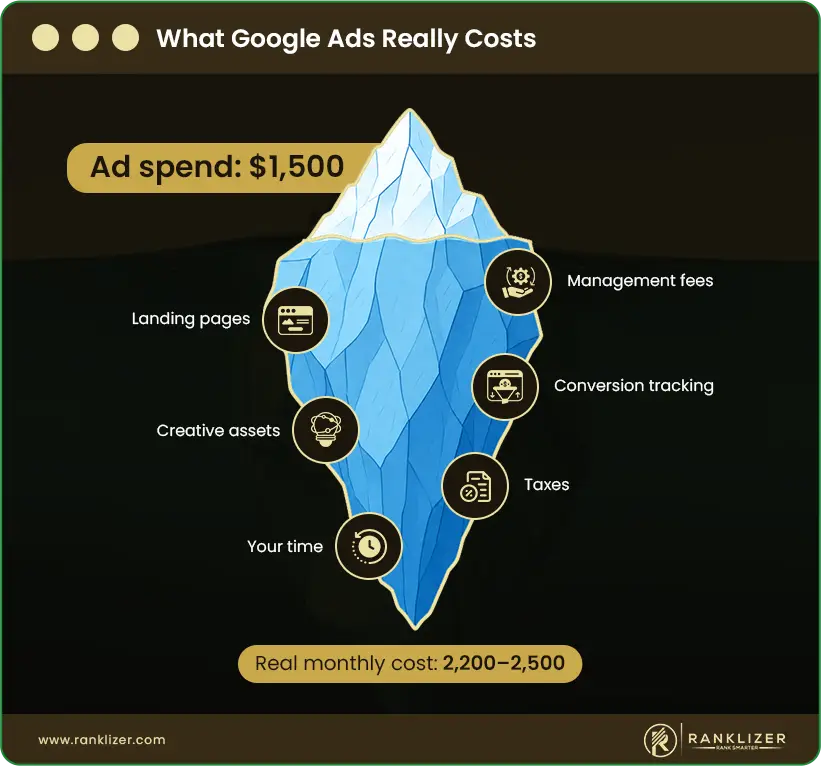
Your ad spend isn’t the only cost to plan for. Here are a few other expenses to keep in mind:
- Management fees: If you hire an agency, expect either a flat monthly fee (often a few hundred to a couple of thousand dollars for smaller accounts) or 10–20% of your ad spend.
- Landing pages: Sending ad traffic to your homepage usually wastes clicks. A dedicated landing page can make a bigger difference than an extra $500 in ad spend.
- Conversion tracking: Without it, you can’t measure your CPA, and Google’s automated bidding has nothing to learn from.
- Creative assets: Display and Performance Max campaigns need images, and ideally video too.
- Taxes: Depending on your country, taxes like VAT or GST can add to your total cost.
- Your time: Managing your own account takes a few hours a week of monitoring and tweaking.
Add it all up, and a $1,500 ad budget can easily turn into 2,200–2,500 a month.
Your First 90 Days with Google Ads: When to Scale, Hold or Cut
Try to give a new campaign about three months before deciding whether it works. Results in the first few weeks can bounce around quite a bit.
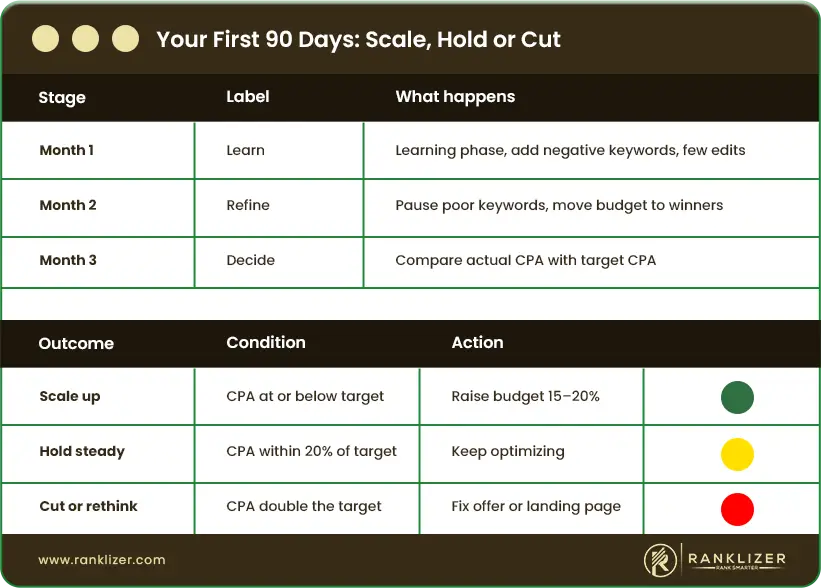
- Month 1: Learn. Expect some ups and downs. Google’s automated bidding goes through a learning phase (usually a week or two) after you launch or make big changes, so try not to make too many edits. Check your search terms report weekly and add negative keywords as you go.
- Month 2: Refine. Pause keywords that spend money without bringing in conversions, move more budget toward what’s working, and test new ad copy.
- Month 3: Decide. Compare your actual CPA to the target CPA you set in Method 2.
Once you hit the 90-day mark, here’s how to decide what’s next:
- Scale up if your CPA is at or below your target. If Google shows your campaign as “Limited by budget,” that’s a sign there’s room to grow, as long as the extra traffic is likely to be profitable. Increase your campaign budget gradually, by about 15–20% at a time.
- Hold steady if your CPA is within about 20% of your target. Keep optimizing. You’re close!
- Cut back or rethink if your CPA is still double your target and your tracking is working correctly. At that point, the problem is usually your offer, landing page or market, not your budget.
One more thing to watch for: if spending more only gets you clicks on broad, low-intent searches, you’ve likely hit the limit for your current keywords.
How to Make a Small Google Ads Budget Go Further
Working with a smaller budget? No problem. These tips can help you get more out of your Google Ads budget for small business campaigns:
- Add negative keywords from day one. Words like “free,” “jobs,” “DIY” and “salary” can quietly eat up a small budget.
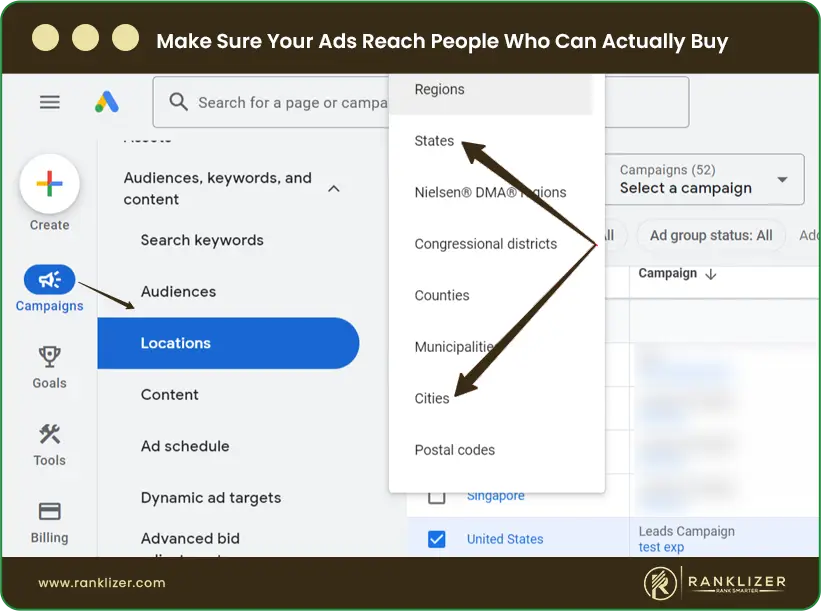
- Tighten your location targeting. Choose the “Presence” option so your ads reach people who are actually in your area, not just people searching for it.
- Schedule your ads. Run them during the hours your customers buy, or when someone’s available to answer the phone.
- Start with exact and phrase match. Broad match needs plenty of data and budget to work well. On a small budget, it can drift off course.
- Keep it focused. One campaign with a few tightly themed ad groups will collect data much faster than five campaigns competing for the same budget.
- Bid on your brand name. Branded keywords are usually cheap since they’re specific to your business.
- Improve your relevance. When your keywords, ads, and landing pages closely match, your Quality Score improves, and your CPC tends to go down.
- Try the budget simulator. Google’s built-in budget simulator shows how changing your budget might affect your clicks and conversions.
Google Ads Budget FAQs
Is $10 a day enough for Google Ads?
It can be! If clicks cost 1–2 in your industry, $10 a day gets you about 150–300 clicks a month. But if clicks cost $5 or more, you won’t get enough data to judge your results.
What is the minimum budget for Google Ads?
Google doesn’t have a minimum budget. In practice, aim for enough to get around 300 clicks a month, which is usually 1,000–1,500 for a typical business.
How much does Google Ads cost per month for a small business?
Small businesses typically spend 1,500–4,000 a month on ads, depending on their industry and location. Agency fees are extra.
Does Google Ads cost the same in every country?
No. Local auctions set click prices, so costs can vary widely between countries and even cities. Use Keyword Planner to check prices for your target locations.
Can Google spend more than my daily budget?
Yes. Google can spend up to twice your daily budget on busy days, but you won’t be charged more than 30.4 times your daily budget in a month.
How long does it take for Google Ads to work?
You’ll start getting clicks within a few days. But give it 60–90 days to see your true cost per acquisition.
What percentage of revenue should go to Google Ads?
A common guideline is to spend 6–10% of revenue on marketing, with 20–40% of that going to Google Ads. Established eCommerce brands often spend 10–15% of their target revenue.
The Bottom Line
There’s no one-size-fits-all Google Ads budget. The right amount depends on your industry, your location and what a customer is worth to you.
Start with enough to get around 300 clicks a month, set up conversion tracking from day one, and give your campaign a full 90 days. From there, let your cost per acquisition, not industry averages, tell you when it’s time to spend more.
And if you can only start small, that’s okay! Just set realistic expectations, keep your campaigns focused, and build from there.