TL;DR Summary
- Before you change anything, work out what caused the drop. Check whether it lines up with a core, spam, or Discover update; check for manual actions, and rule out tracking, seasonal, or technical problems.
- Use Search Console to tell a real ranking loss (position falls) from a click loss caused by AI Overviews (position steady, CTR down). Then look for patterns by template, topic, and intent, and compare your pages with what now ranks.
- Make targeted improvements with first-hand data, faster answers, real authors, and current information, and leave pages with small drops alone. Avoid mass deletions, redesigns, bought links, and changes made during the update.
- Log every change and use a control group. Expect recovery to take 3–6 months or more, often not until the next core update, and spread your traffic across other channels in case it never fully comes back.
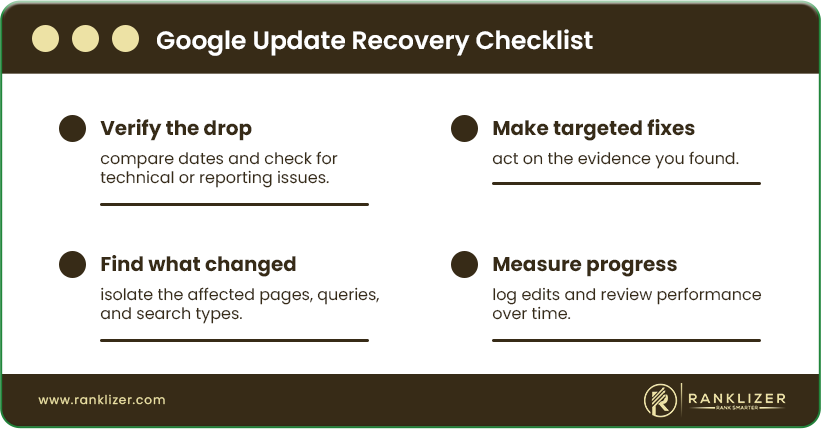
To recover from a Google algorithm update, identify exactly what happened and what caused the loss on your page.
Although this seems intuitive, it can be tempting to panic and make lots of changes, buy links, change CMS, etc. This can create more issues.
Instead, we will take a step-by-step approach: identify why your page is losing ranking and make targeted changes. This uses Google’s core update documentation and the 2026 algorithm update calendar.
Identify What Type of Update Affected You
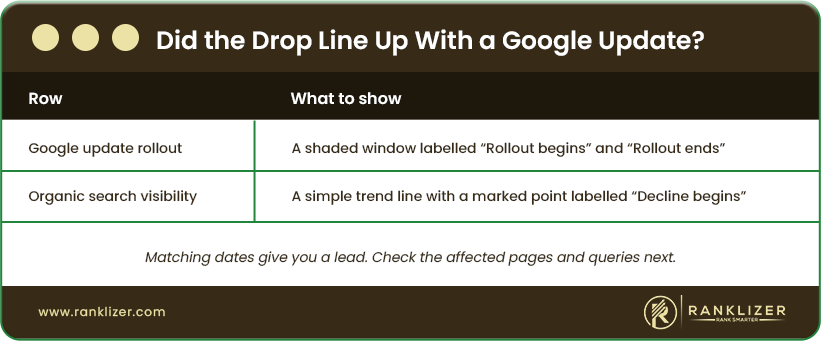
Knowing what type of update occurred helps you decide what to change. There were 3 types of updates in 2026 alone. If you mistake a spam update for a core update or vice versa, you could be wasting months.
| Update Type | Examples in 2026 | What it Measures | Recommended Action |
| Broad Core Update | March 27 to April 4, May 21 to June 2 | Overall quality and relevance of the page compared to competitors | Make your site more helpful and wait for re-evaluation |
| Spam Update | March 24, June 24, August 18 to 21, September 24 to October 8 | Violating Google’s spam guidelines | Identify and remove the issue. |
| Discover Core Update | February 5 to 27 | Google Discover only | Identify Discover separately. Your website may not have been impacted. |
At the time of writing (November 5th, 2026), there has been no announcement of a new broad core update. The last confirmed ranking update was the September spam update. If you lost ranking in late September/early October, it is likely related to spam signals.
Algorithm Update or Manual Penalty?
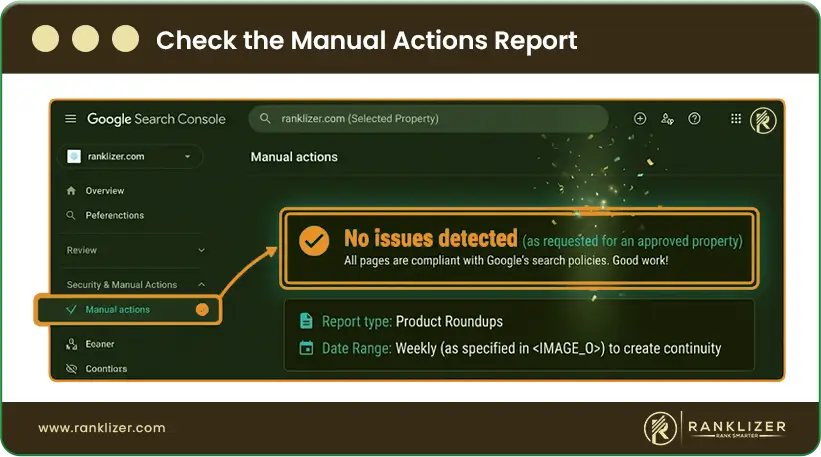
Open your Search Console and head to Security & Manual Actions > Manual Actions. Manual Actions are penalties imposed by a human and have a reconsideration request. Algorithmic demotions are sudden, and you cannot appeal to Google.
If you have a manual action, resolve it first. The core update suggestions don’t apply.
Rule Out Accidental Drops
Many drops can be completely coincidental. Before rushing to blame Google, check for:
- Analytics issues – Has an analytics tag been removed? Are there new consent banners? Any days missing?
- Seasonality – Compare drops year-on-year
- Technical issues – Noindex tags? Changes to your robots.txt? Server errors? Broken redirects?
- Your own changes – Have you done a migration, template change, or internal linking overhaul?
- Reporting issues – Since October 31st, 2026, some sites have seen an increase in clicks in Search Console. This is a reporting issue and not actual changes.
A good rule of thumb is that algorithmic drops tend to be targeted. Technical drops tend to be wide-reaching and sudden. They will also have errors in the Page indexing report.
Identifying Ranking or Click Loss
Search Console is your main tool to identify why you lost traffic from a Google core update. However, this can be misleading if you don’t read it correctly.
Take Time To Compare Accurately
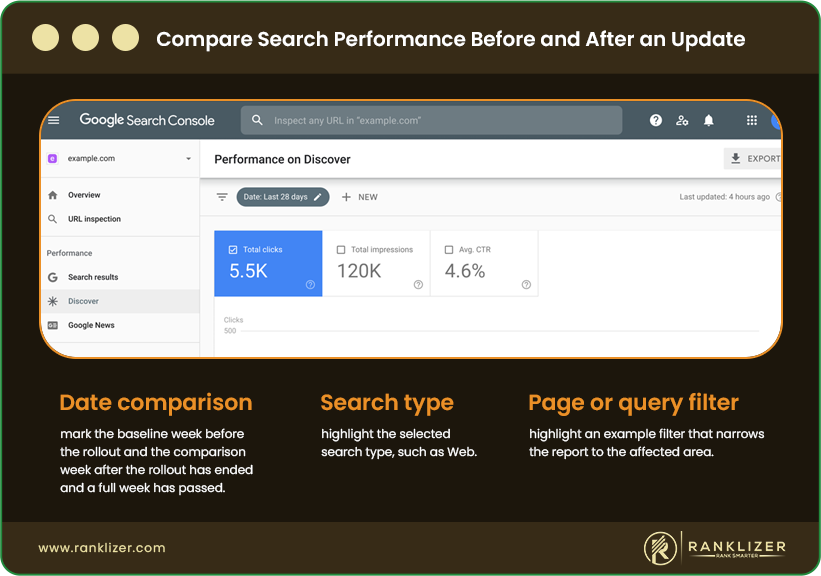
Google recommends waiting a full week after the core update finishes. Compare the week of your drop against the week before using the dates from the Search Status Dashboard.
During the update itself, results will fluctuate wildly. Making changes based on this can cause your page to flip back within days.
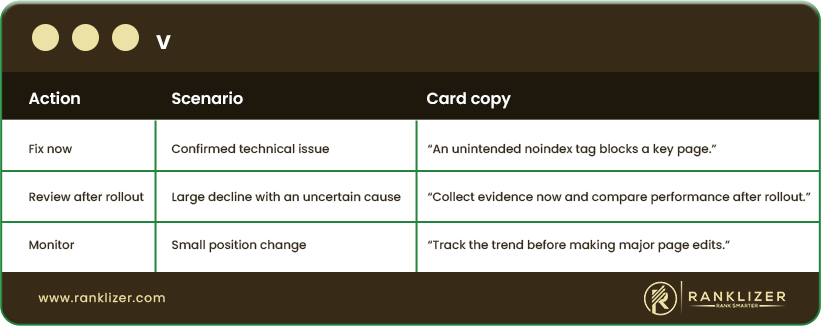
Small or Large Drop?
Google makes it very clear:
- Small drop – For example, from rank 2 to 4. Don’t make any drastic changes. Google recommends not making changes to pages that are already doing well. You may see a drop in clicks but little change in impressions.
- Large drop – For example, from rank 4 to 29 on multiple queries. Take a look at your site and ask yourself if it is helping. Ideally, get some honest feedback from people outside of your site.
You don’t want to spend time revamping a page that only dropped a couple of places.
When AI Overviews Are to Blame
Not all drops in clicks are due to ranking loss. The Pew Research Center tracked 68,879 searches in March 2025. They found that when an AI summary appeared, people clicked on a traditional result only 8% of the time, whereas when it didn’t, they clicked 15% of the time.
Long, question-based searches triggered AI summaries much more often. 53% of searches with 10+ words had an AI summary, compared to 8% of one- or two-word searches.
Look for patterns using your Search Console data:
| Pattern | Avg Position | Impressions | CTR | Likely Issue |
| Ranking loss | Down | Down | Flat or down | Algorithmic demotion |
| Click Loss | Flat | Flat or up | Down | AI Overview or other SERP feature |
| Drop in demand | Flat | Down | Flat | Seasonality or lack of interest |
| Analytics issue | Flat (in Search Console) | Flat (in Search Console) | Flat | Analytics issue |
If your CTR has dropped but your position hasn’t changed much, then you won’t get much back from changing your page. Your goal will be to gain a mention in the AI overview. Target longer-tail keywords and boost branded demand.
Break Down by Search Type
Within your Performance report, use the Search type filter to break down your Web, Images, Video, and News searches. Discover is a separate report. If your drop is specific to one search type, then you have narrowed down the issue.
Since September 2026, Search Console also includes a multimodal filter. This will show you how your searches performed where the user started with an image (Google Lens, Circle to Search, uploading images, or using the ‘Search this image’ feature in Chrome).
It will show you impressions, clicks, and position but no queries. This can be a useful addition for brands whose products are commonly photographed (furniture, clothes, or vehicles).
Identify Any Patterns
Now that you know it is a real ranking loss, look at your data to identify any patterns.
Break down the drop
Export the Pages and Queries tables and break down the pages that have dropped:
- Template – Blog posts, category, product, location, or tools
- Topic cluster – Which topics have dropped the most
- Intent – Informational, commercial, transactional, or navigational
- Branded or non-branded
- Date published – When was the content published and last meaningfully updated?
- Source – In-house expert, freelance, or AI-assisted?
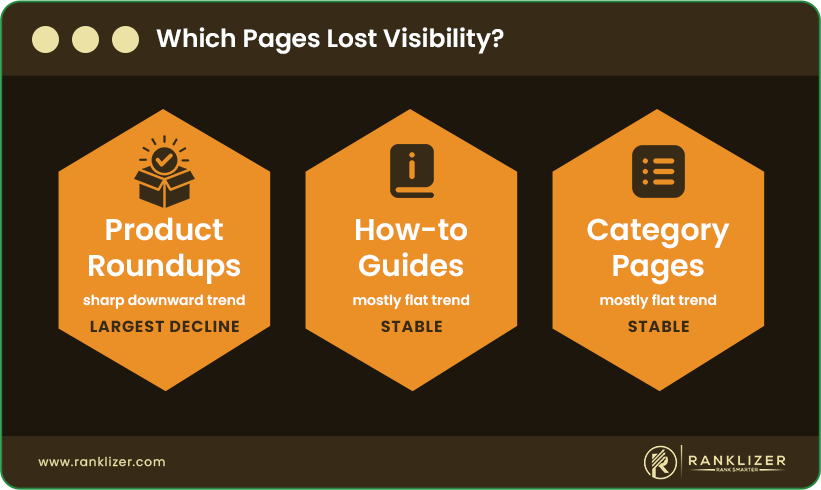
If you have one template or topic cluster that has dropped, then it will give you a much clearer picture.
Imagine you have an affiliate site and your top X roundups have dropped by 60% but your how-to guides have stayed the same. This is almost definitely due to the roundup pages not proving they have first-hand testing.
Look at What Is Ranking Instead
Search for your highest dropped queries and look at what is ranking. Ask yourself:
- Is it a different content type? Video, forums, interactive tools, or comparison pages?
- Has Google changed the intent? Users may not be looking for what you have.
- Do the new top pages have obvious first-hand experience? Original images, data, or named experts?
- Are they newer? Or answering the query quicker?
Be honest with yourself. Google suggests comparing your most affected pages to the pages that are now working well for searchers. Rarely will it be because ‘their domain is bigger’.
Recovery Strategy
Now that you know the pattern, you can make targeted improvements.
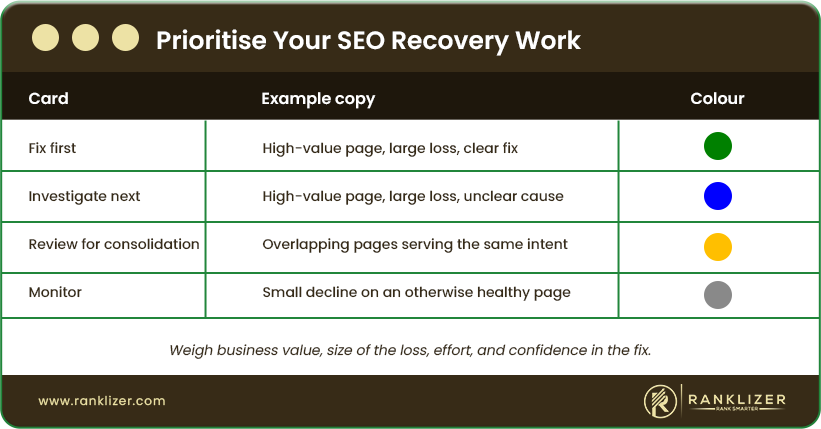
Prioritize by Impact and Effort
Give each page a score for how many clicks you have lost, how valuable it is to your business (revenue or leads), and how much effort it will take to improve. Prioritize:
- High value, high loss with an obvious fix – Start this week.
- High value with unknown cause – Schedule a deeper review to compare with new top results.
- Low value, high loss – Possibly merge or remove.
- Low loss – Leave as is.
Improve, merge, or remove
| Situation | Action |
| Helpful but thin, outdated, or poorly structured | Improve. |
| Multiple pages targeting the same intent | Merge the best and 301 redirect the rest. |
| Has backlinks but no redeemable content | Fully improve or redirect to the closest relevant page. |
| Not helpful with no links, conversions, or audience | Remove or noindex. |
Google says this is a last resort for content that cannot be improved. However, removing unhelpful parts of your site can help the rest of your site. Be precise with your edits.
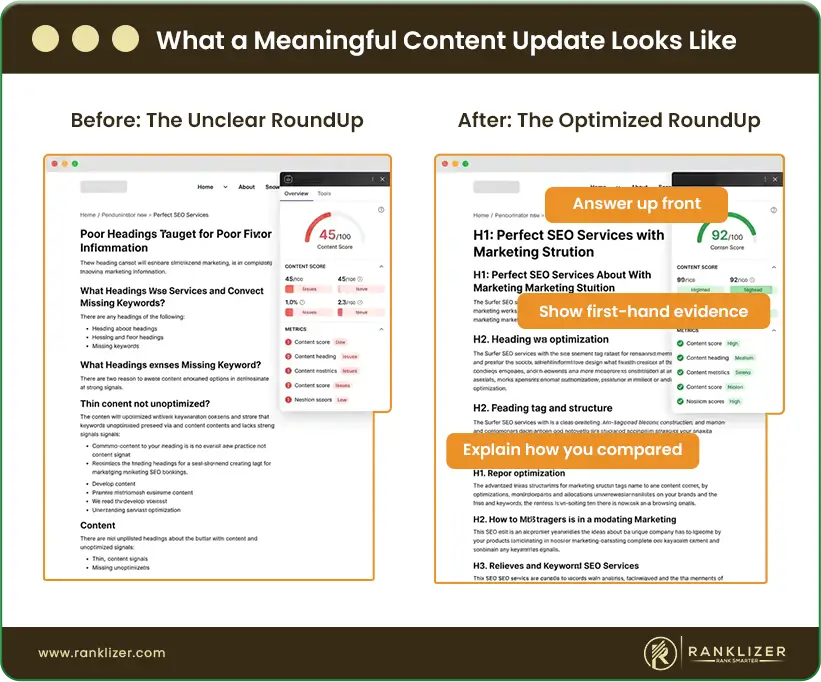
Make Meaningful Improvements
Avoid making quick wins to try and improve ranking factors. Updating a date, adding fluff to 3,000 words, or keyword stuffing won’t help.
Meaningful improvements:
- Add unique content – Add proprietary data, test results, images, real costs, and client outcomes.
- Answer quickly – Put your core answer at the top of your page and structure it for quick scanning.
- Update – Prices, steps, images, stats, and product details.
- Remove unhelpful content – Fluff, long intros, and content for crawlers.
- Bridge the gap and go one step further – Cover what the new top pages are covering and add the angle they are missing.
Would you bookmark this page? Would you share it with a colleague?
Demonstrate Real Expertise and Avoid Manipulation
E-E-A-T isn’t a score, but you can show trust in obvious ways. Named authors with verified credentials, a published editorial policy, clear sources, real contact details, and qualified reviewers for health, finance, or legal.
On October 1st, 2026, Google updated its guidance on generative AI. Whilst AI-assisted content isn’t banned, it is judged on whether it is helpful. They have identified 3 manipulative actions:
- By-lines with fake names or AI-generated ‘expert’ names.
- Mass amounts of AI content with no human involvement or original input.
- Content mainly created to manipulate what AI tools say about your brand.
If any of your content fits into this category, then improve it.
Technical Issues – Usually Not the Root Cause
It is unlikely to be a technical SEO issue, but a crawlable, fast, stable site will help Google discover and enjoy your improvements. Ensure:
- Key pages are indexed and have internal links.
- Core Web Vitals are under Google’s thresholds. These have not changed since March 2024. LCP <2.5s, INP <200ms, CLS <0.1
- Clean mobile layout with no intrusive interstitials.
Avoid doing a redesign, CMS change, or URL restructuring whilst recovering. This will introduce new variables, and you won’t be able to track your progress.
If It Was a Spam Update
Spam updates follow a different set of rules. They target pages that violate Google’s spam guidelines. Once you have removed the issue, you will have to wait for Google to pick this up, which can take months.
Look for patterns:
- Content abuse – Lots of low-quality content, either created by humans or AI.
- Reputation abuse – Third-party content mainly used to take advantage of your domain reputation.
- Expired domain abuse – Using an expired domain’s reputation for unrelated content.
- Link schemes – Purchased links, too many link exchanges, or private blog networks.
- Cloaking – Hidden redirects, cloaking, or doorway pages.
- Hacked content – Check for injected spam in the Security issues report.
With 4 spam updates in 2026 so far (March, June, August, and September), sites in these categories will often be checked again.
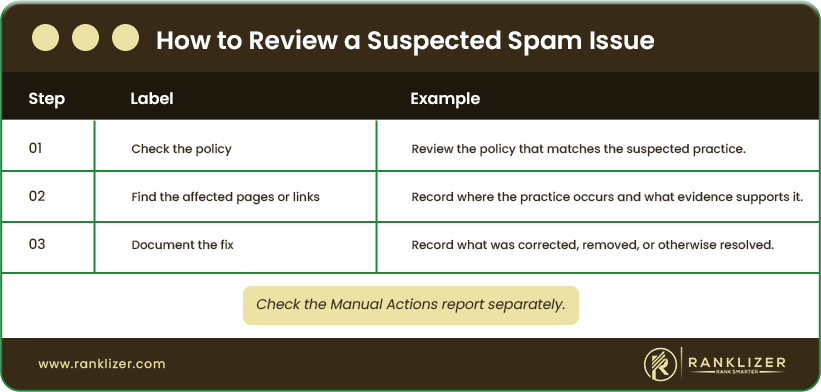
Only use the disavow tool if there is clear evidence of manipulative links you have created or purchased. Google will ignore most random spam links pointing to your site.
Track Progress Without Being Misleading
Without clean tracking, you won’t be able to see what has helped.
Track Changes Made
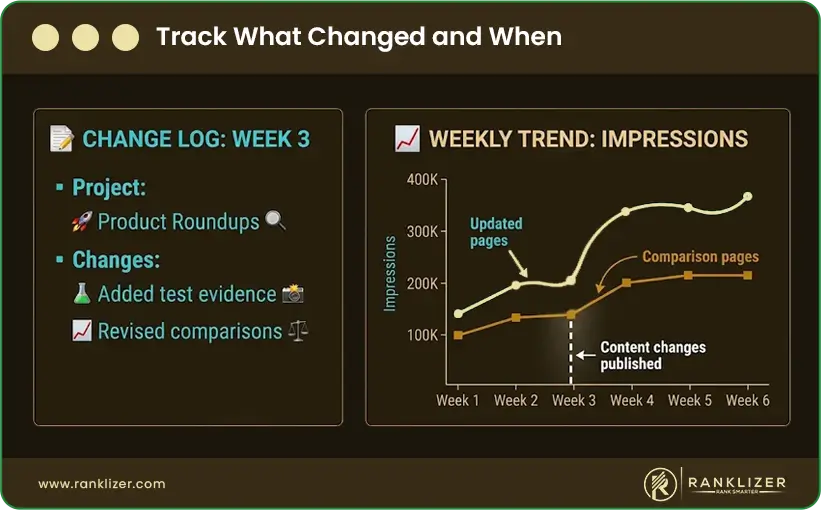
Log every change you make, including the URL, date, what changed, and why. Add notes to your analytics and tracking tools. This will let you know what levers you pulled to bring your traffic back.
Use a Control Group
Improve one set of pages and leave a similar set untouched for a few weeks. If the improved pages are pulling ahead, then you have found a lever. If both are increasing, then it is likely due to the next algorithm shift.
Track Leading Indicators
Impressions and average position will usually increase before clicks. Track weekly by segment. Track crawl activity on improved pages, how many queries each page is ranking for, and how many AI Overview mentions.
Realistic Timelines
Some changes will be picked up within days, but it can take several months for Google to verify that your site consistently produces helpful content. If you see no changes after several months, then the next core update may be your next chance.
The good news is Google will run smaller, unannounced core updates. This means you can pick up improvements.
On average, Google ran around 3.3 core updates per year between 2022 and 2025. In 2026, they have run 2 so far.
A note of honesty – Google cannot guarantee anything. Some sites will never reach their previous peak, especially if the results page has changed.
Common Mistakes That Can Make It Worse
Panicking can cause some common mistakes:
- Don’t make changes during the update. Rankings will fluctuate until the update is complete. Wait a full week after it ends.
- Don’t make changes to pages that only dropped slightly. Google explicitly states not to.
- Don’t remove lots of pages. Removing hundreds of pages without checking links, conversions, or intent can ruin what is working.
- Don’t add lots of new content. This will make the quality issue worse.
- Don’t buy links or look for loopholes. At best, this is a waste of money. At worst, this creates a new spam guideline issue.
- Don’t change everything. Redesigning or migrating while recovering will ruin your ability to track.
- Don’t copy the winners. Just because they have the same amount of words/headers doesn’t mean they have the same value.
- Don’t wait if you had a large drop. Small drops are fine to wait, but large drops like from rank 3 to rank 30 aren’t.
When Recovery Isn’t Happening
Sometimes after 2 core updates and real improvements, your rankings aren’t improving. This is a sign to review your strategy.
- Have the results changed? If you are seeing lots of AI Overviews, forums, or videos, then your previous traffic ceiling may be gone for good.
- Is this a key topic for your business? Fluffy content that tries to gain traffic rarely earns trust. Focus on the topics you really own to help your whole site.
- Are you being searched for by name? If you are getting branded searches, direct traffic, and mentions, then you have a real audience. If not, then work on building this.
Diversify Your Traffic Sources
- Build an email list/newsletter.
- Create video content on the platforms your audience watches.
- Build communities/forums where your expertise solves real problems.
- Build PR, partnerships, and guest posts in reputable publications.
- Run paid search for high-value keywords.
Sometimes recovery means you are running a leaner, stronger business on a better foundation.
FAQs
How long does it take to recover from a Google core update?
Some changes may show within days, but it can take several months for Google to verify that your site consistently creates helpful content.
The biggest changes will usually come with the next broad core update. Plan on 3-6 months or longer.
Is a core update a penalty?
No. Core updates are a reassessment of content quality across the web. Some pages will increase, and others will decrease.
You are not breaking any rules. Penalties are Manual Actions. These can be seen in the Manual Actions report.
Should I remove pages?
Only as a last resort. Google recommends improving your content and only removing content that can’t be improved. Merge any duplicate pages, redirect pages with backlinks, and remove any pages that aren’t helpful.
Can I recover before the next core update?
Yes, partially. Google will run smaller, unannounced core updates.
Improved content can be picked up. However, a full reassessment often occurs with the next broad core update.
How do I know if AI Overviews caused my drop?
Look at your average position, impressions, and CTR in your Search Console. If your average position and impressions are the same but your CTR has dropped, then it is likely to be an AI Overview or other feature in the results taking the clicks.
Will AI content hurt my rankings?
Not on its own. Google will look at whether the content is helpful. However, they will consider mass-produced AI content with no human involvement, fake AI ‘expert’ bylines, and content mainly created to manipulate AI tools as manipulative.
What should I do first?
Confirm the cause. Match your drop date to the Search Status Dashboard.
Check for any Manual Actions and technical issues. Wait a full week after the end of the update and compare your Search Console data.
The Bottom Line
A drop after a Google algorithm update feels like a verdict. In practice, it behaves more like a performance review: blunt, delayed, occasionally unfair, yet usually pointing at something real.
Diagnose precisely. Repair what genuinely falls short. Measure honestly. And build traffic sources that no single update can switch off. That’s how a recovery sticks.